SwiftUI TabView (Custom TabView)
SwiftUI는 UIKit에 비해서 TabView가 더 심플하다
SwiftUI를 공부하면서 전체적으로 느끼는데, 매우 단순해지고 컴포넌트 단위로 레고 쌓듯이 조립하는거 같다.
단점이라고는 숙련도가 낮아서 기간이 정해진 개발을 진행할 때 UIKit을 더 우선적으로 선택하는거 같다.
특히 레이아웃이 좀만 복잡하다 싶으면 바로 UIKit으로 가는 경향이 있다.
TabView 샘플 코드
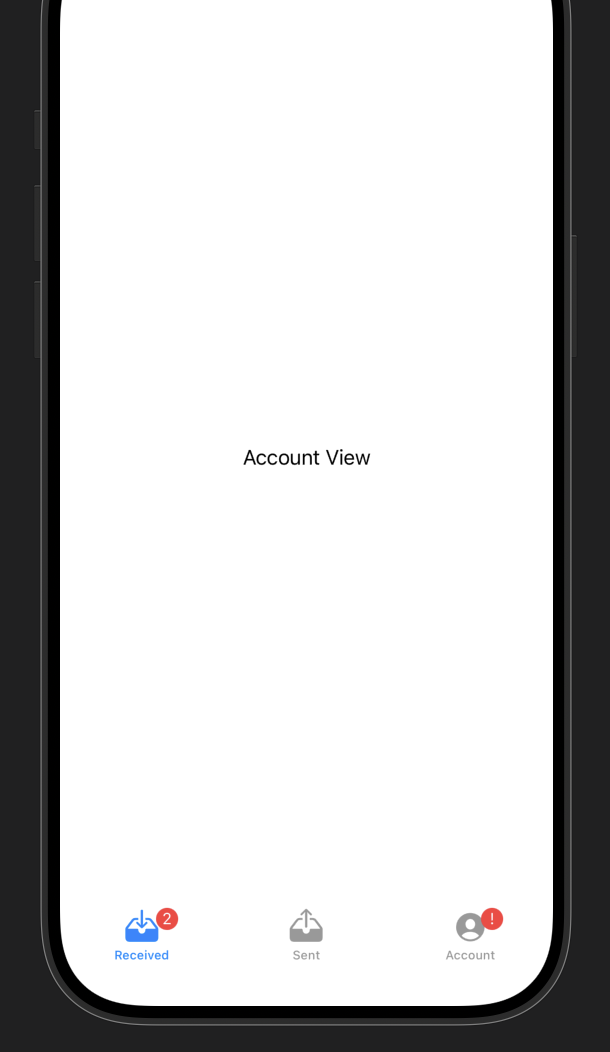
TabView를 사용하는 샘플 코드이다.
애플 공식 사이트
import SwiftUI

struct MyTabView: View {
    var body: some View {
        TabView {
            Tab("Received", systemImage: "tray.and.arrow.down.fill") {
                ReceivedView()
            }
            .badge(2)

            Tab("Sent", systemImage: "tray.and.arrow.up.fill") {
                SentView()
            }

            Tab("Account", systemImage: "person.crop.circle.fill") {
                AccountView()
            }
            .badge("!")
        }
    }
}

struct AccountView: View {
    var body: some View {
        Text("Account View")
    }
}

struct SentView: View {
    var body: some View {
        Text("Account View")
    }
}

struct ReceivedView: View {
    var body: some View {
        Text("Account View")
    }
}
Custom TabView 및 샘플코드
서비스에서는 탭뷰를 커스텀하기도 하는데, View라서 바로 진행하면 된다.
특히 iPhone 12와 iPhone SE2에서 View의 bottom의 safeArea가 다른데 이를 주의해야 한다.
enum TabIndex {
    case home, cart, profile
}

struct MyCustomTabView: View {
    @State private var tabIndex: TabIndex = .cart
    @State private var maxScale: CGFloat = 1.4

    var body: some View {
        GeometryReader { geometry in
            ZStack(alignment: .bottom) {
                VStack {
                    Spacer()
                    self.changeMyView(tabIndex: self.tabIndex)
                }
                .background(Color.red)

                Circle()
                    .frame(width: 90, height: 90)
                    .offset(
                        x: self
                            .calcCircleBgPosition(
                                tabIndex: self.tabIndex,
                                geometry: geometry
                            ),
                        y: UIApplication.shared.windows.first?.safeAreaInsets.bottom == 0 ? 20 : 0
                    )
                    .foregroundColor(Color.white)

                VStack(spacing: 0) {
                    HStack(spacing: 0) {
                        Button(
                            action: {
                                withAnimation {
                                    self.tabIndex = .home // 애니메이션과 함께 변경
                                }

                            }) {
                                Image(
                                    systemName: "house.fill"
                                )
                                .font(
                                    .system(
                                        size: 25
                                    )
                                )
                                .scaleEffect(
                                    self.tabIndex == .home ? self.maxScale : 1.0
                                )
                                .foregroundColor(
                                    self.tabIndex == .home ? self.changeIconColor(
                                        tabIndex: self.tabIndex
                                    ) : Color.gray
                                )
                                .frame(
                                    width: geometry.size.width / 3,
                                    height: 50
                                )
                                .offset(
                                    y: self.tabIndex == .home ? -10 : 0
                                ) // 선택하면 -10만큼 위로 올라오게끔
                            }
                            .background(Color.white)

                        Button(
                            action:{
                                withAnimation {
                                    self.tabIndex = .cart
                                }

                            }) {
                                Image(systemName: "cart.fill")
                                    .font(.system(size: 25))
                                    .scaleEffect(self.tabIndex == .cart ? self.maxScale : 1.0)
                                    .foregroundColor(
                                        self.tabIndex == .cart ? self.changeIconColor(
                                            tabIndex: self.tabIndex
                                        ) : Color.gray
                                    )
                                    .frame(width: geometry.size.width / 3, height: 50)
                                    .offset(y: self.tabIndex == .cart ? -10 : 0)
                            }
                            .background(Color.white)

                        Button(
                            action:{
                                withAnimation {
                                    self.tabIndex = .profile
                                }

                            }) {
                                Image(systemName: "person.circle.fill")
                                    .font(.system(size: 25))
                                    .scaleEffect(
                                        self.tabIndex == .profile
                                        ? self.maxScale
                                        : 1.0
                                    )
                                    .foregroundColor(
                                        self.tabIndex == .profile ? self.changeIconColor(
                                            tabIndex: self.tabIndex
                                        ) : Color.gray
                                    )
                                    .frame(
                                        width: geometry.size.width / 3,
                                        height: 50
                                    )
                                    .offset(
                                        y: self.tabIndex == .profile
                                        ? -10
                                        : 0
                                    )
                            }.background(Color.white)
                    }
                    Rectangle()
                        .foregroundColor(Color.white)
                        .frame(
                            height: UIApplication.shared.windows.first?.safeAreaInsets.bottom == 0
                            ? 0
                            : 20
                        )
                }
            }
        }
        .edgesIgnoringSafeArea(.all)
    }

    func changeMyView(tabIndex: TabIndex) -> AccountView {
        switch tabIndex {
        case .home:
            return AccountView()
        case .cart:
            return AccountView()
        case .profile:
            return AccountView()
        }
    }

    /// tabIndex에 따라서 컬러를 변경합니다.
    func changeIconColor(tabIndex: TabIndex) -> Color {
        switch tabIndex {
        case .home:
            return Color.green
        case .cart:
            return Color.purple
        case .profile:
            return Color.blue
        default:
            return Color.green
        }
    }

    /// tabIndex와 geometry정보를 받아서 탭뷰의 Circle의 위치를 결정하여 반환합니다.
    func calcCircleBgPosition(
        tabIndex: TabIndex,
        geometry: GeometryProxy
    ) -> CGFloat{
        switch tabIndex {
        case .home:
            return -(
                geometry.size.width / 3
            )
        case .cart:
            return 0 // xPosition을 반환하는데 화면의 중앙이 0
        case .profile:
            return geometry.size.width / 3
        default:
            return -(geometry.size.width / 3)
        }
    }

}

struct AccountView: View {
    var body: some View {
        Text(
            "Account View"
        )
    }
}

(링크)
https://developer.apple.com/documentation/swiftui/tabview
TabView | Apple Developer Documentation
A view that switches between multiple child views using interactive user interface elements.
developer.apple.com
'Apple > SwiftUI, Combine' 카테고리의 다른 글
| SwiftUI ButtonStyle 적용해보기 (0) | 2022.05.23 |
|---|---|
| SwiftUI @State @Binding @EnvironmentObject (0) | 2022.05.19 |
| SwiftUI GeometryReader (0) | 2022.05.19 |
| SwiftUI NavigationView (0) | 2022.05.18 |
| SwiftUI List (UITableView, UICollectionView) (0) | 2022.05.18 |