iOS Haptic Feedback 정리
이 글을 벌써 두번째 쓰는데 ㅎㅎ 다 썼는데 뒤로가기 스와이프해서 글 다 날아감.
Overview
햅틱 이벤트인데 이걸로 진동 만들 수 있음.
Core Haptic과 관련한 설명인데 특별한 내용은 없음.

Essentials
아래 문서를 참고하면 더 깊게 이해할 수 있음.
특히, 장치 상태에 대한 확인이라던가, 햅틱 엔진은 싱글톤이 아니라던가 하는 부분

iOS 13 이후로는 몇가지 햅틱 레벨이 추가되었음.
현재는 주로 최소지원 타겟을 iOS 10으로 작업하고 있는데
iOS 13이라면 새로운 Style을 사용할 수 있음.
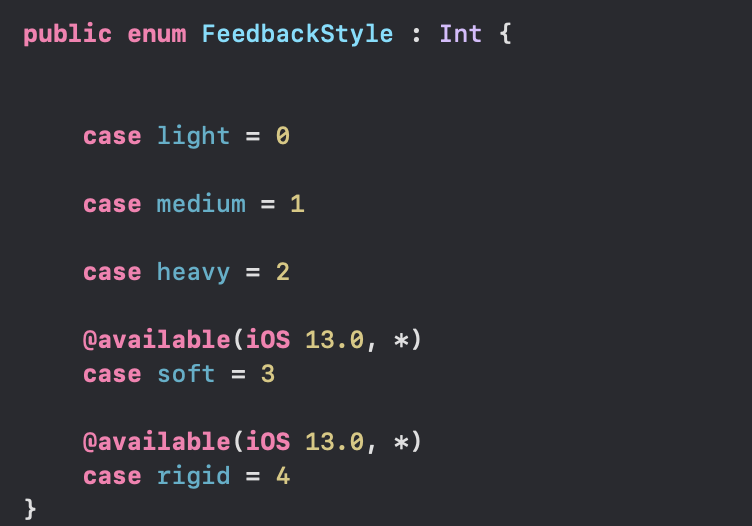
샘플코드
우리 앱에서는 동일한 햅틱엔진 하나만 있어도 충분함.
final class HapticManager {
    static let shared = HapticManager()

    private var generator: UIImpactFeedbackGenerator?

    func setupGenerator() {
        generator = UIImpactFeedbackGenerator()
        generator?.prepare()
    }

    func createImpact(style: UIImpactFeedbackGenerator.FeedbackStyle = .heavy) {
        generator?.impactOccurred()
    }

    func release() {
        generator = nil
    }
}
소감
프로젝트에 적용했는데 어렵지 않았음.
특히 release 부분도 생각하기
물리학 개념과 동일해서 어렵진 않았는데, 이러면 진동에 대한 부분을 내 맘대로 만들 수 있겠다는 생각이 듦.
(링크)
https://developer.apple.com/design/human-interface-guidelines/ios/user-interaction/haptics
Haptics - User Interaction - iOS - Human Interface Guidelines - Apple Developer
Haptics Haptics engage people’s sense of touch to enhance the experience of interacting with onscreen interfaces. For example, the system plays haptics in addition to visual and auditory feedback to highlight the confirmation of an Apple Pay transaction.
developer.apple.com
https://developer.apple.com/documentation/corehaptics
Apple Developer Documentation
developer.apple.com
'Project > Kuring(공지알림)' 카테고리의 다른 글
| iOS UITableViewCell Swipe Action 구현하기 (0) | 2022.05.05 |
|---|---|
| iOS UIActivicityIndicator Customizing (feat. Lottie) (0) | 2022.04.30 |
| [iOS] inAppReview(StoreKit) - 인앱 리뷰 (0) | 2022.03.06 |
| [iOS] Xcode Storyboard 제거 후 코드로 대체하는 방법 (0) | 2022.01.07 |
| [iOS] RxGesture에 정리 기본 (0) | 2021.12.20 |