Flutter 로그인 페이지 실습 코드 리팩토링
이전 포스팅의 실습을 리팩토링을 진행할 것.
프로젝트 구조도
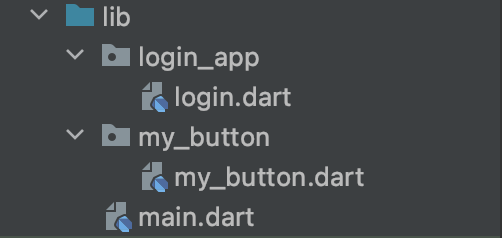
login.dart
import 'package:flutter/material.dart';
import 'package:signin_refactoring/my_button/my_button.dart';

class LogIn extends StatelessWidget {
  const LogIn({Key? key}) : super(key: key);

  @override
  Widget build(BuildContext context) {
    return Scaffold(
      appBar: AppBar(
        backgroundColor: Colors.blue,
        title: Text(
          'Sign In',
          style: TextStyle(color: Colors.white),
        ),
        centerTitle: true,
        elevation: 0.2,
      ),
      body: buildButton(),
    );
  }

  Widget buildButton() {
    return Padding(
      padding: EdgeInsets.all(16.0),
      child: Column(
        mainAxisAlignment: MainAxisAlignment.center,
        children: <Widget>[
          ButtonTheme(
            height: 50.0,
            child: MyButton(
              image: Image.asset('images/glogo.png'),
              text: Text(
                'Login with Google',
                style: TextStyle(color: Colors.black87, fontSize: 15.0),
              ),
              color: Colors.white,
              radius: 4.0,
              onPressed: () {},
            ),
          ),
          SizedBox(
            height: 10.0,
          ),
          ButtonTheme(
            height: 50.0,
            child: MyButton(
              image: Image.asset('images/flogo.png'),
              text: Text(
                'Login with Google',
                style: TextStyle(color: Colors.black87, fontSize: 15.0),
              ),
              color: Colors.blueAccent,
              radius: 4.0,
              onPressed: () {},
            ),
          ),
          SizedBox(
            height: 10.0,
          ),
          ButtonTheme(
            height: 50.0,
            child: RaisedButton(
              child: Row(
                mainAxisAlignment: MainAxisAlignment.spaceEvenly,
                children: <Widget>[
                  Icon(
                    Icons.mail,
                    color: Colors.white,
                  ),
                  Text(
                    'Login with Email',
                    style: TextStyle(color: Colors.white, fontSize: 15.0),
                  ),
                  Opacity(
                    opacity: 0.0,
                    child: Icon(
                      Icons.mail,
                      color: Colors.white,
                    ),
                  ),
                ],
              ),
              color: Colors.green,
              onPressed: () {},
            ),
            shape: RoundedRectangleBorder(
              borderRadius: BorderRadius.all(
                Radius.circular(4.0),
              ),
            ),
          ),
        ],
      ),
    );
  }
}
my_button.dart
import 'package:flutter/material.dart';
import 'package:signin_refactoring/login_app/login.dart';

class MyButton extends StatelessWidget {

  MyButton({this.image,this.text,this.color,this.radius,this.onPressed});

  final Widget? image;
  final Widget? text;
  final Color? color; // 여기서 Colors 아니게 조심
  final double? radius;
  final VoidCallback? onPressed;

  @override
  Widget build(BuildContext context) {

    final LogIn logIn = new LogIn();
    logIn.buildButton();


    return ButtonTheme(
      height: 50.0,
      child: ElevatedButton(
        child: Row(
          mainAxisAlignment: MainAxisAlignment.spaceEvenly,
          children: <Widget>[
            image!,
            text!,
            Opacity( // 이 위젯에 대해서 알아보기
              opacity: 0.0,
              child: Image.asset('images/glogo.png'),
            ),
          ],
        ),
        style: ElevatedButton.styleFrom(
          primary: color
        ),
        onPressed: onPressed,
      ),
      shape: RoundedRectangleBorder(
        borderRadius: BorderRadius.all(
          Radius.circular(radius!),
        ),
      ),
    );
  }
}
main.dart
import 'package:flutter/material.dart';
import 'login_app/login.dart';
import 'my_button/my_button.dart';
void main() {
  runApp(MyApp());
}

class MyApp extends StatelessWidget {
  // This widget is the root of your application.
  @override
  Widget build(BuildContext context) {
    return MaterialApp(
      title: 'Firebase Login',
      theme: ThemeData(
        primarySwatch: Colors.blue,
      ),
      home: LogIn(),
    );
  }
}'Flutter > 2.0' 카테고리의 다른 글
| Flutter Networking (api, json parsing) 실습 (0) | 2021.08.17 |
|---|---|
| Flutter Future, async, await 이해하기 (0) | 2021.08.17 |
| Flutter 로그인과 주사위 앱 실습 (0) | 2021.08.17 |
| Flutter: StatefulWidget 살펴보기 (0) | 2021.08.16 |
| Flutter: Collection, Generic + Null Safety (0) | 2021.08.16 |